PC troubleshooting
MW4 Secure Attestation Wizard: Download, TPM & Failed Status
Find the official COD Secure Attestation Wizard, check TPM 2.0 and Secure Boot, and distinguish firmware, UAC and Windows errors before changing BIOS settings.
What the attestation check is for
If MW4 reports Failed Attestation Status, start with the Call of Duty Secure Attestation Wizard linked by Activision. It checks PC security configuration; it is not a graphics benchmark or a fix for every crash. MW4 requires both TPM 2.0 and Secure Boot for online modes. Activision’s restrictions for other Call of Duty titles are not interchangeable with MW4’s rule.
Use the official download
- Open Activision’s security support page and find Call of Duty Secure Attestation Wizard.
- Use the download linked on that page. The version checked here is 1.3.0, updated October 21, 2026; use the current official version if it changes.
- Extract the ZIP and open CODSecure
Attestation Wizard.exe. Read the displayed terms yourself and follow the scan prompts. - Record the result and exact failing category. The wizard’s Settings control changes its display language.
Do not substitute a repacked download or enter your Activision password into an unrelated repair site. This guide links to the official page rather than hosting the executable.
Read the result before changing settings
Wide tables can be scrolled sideways.
| Result or category | Next check |
|---|---|
| System compliant | No security configuration change is required by that result; investigate a separate error if the game still fails |
| TPM 2.0 not enabled | Check TPM status and your exact hardware’s support instructions |
| Secure Boot not enabled | Check System Information; distinguish Off from Unsupported |
| Boot partition not GPT / BIOS mode not UEFI | Check the OS disk layout and boot mode together before changing either |
| BIOS firmware update required | Follow the model-specific manufacturer guidance |
| Authorization Key Failed | Follow Activision’s UAC / enrollaik.exe explanation for the official scan |
| TCG Event Log Failed | Apply the current Windows update and restart as Activision directs |
A passing scan is not a guarantee against unrelated network, installation or driver problems.
Check the current Windows state
Press Windows + R and run tpm.msc. Read the TPM status and Specification Version; the required version is 2.0. A “compatible TPM cannot be found” message can mean disabled hardware or unsupported hardware, not automatically a broken game install.
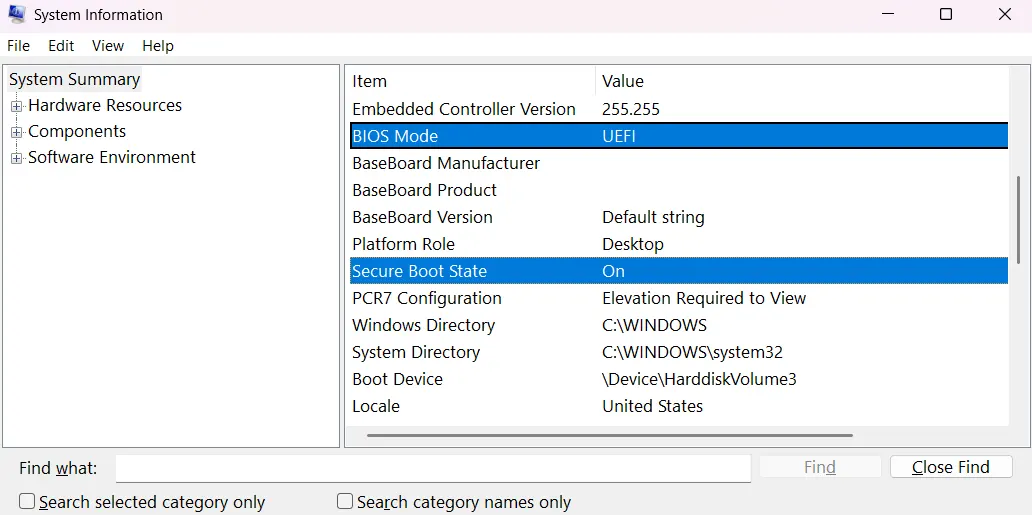
Run msinfo32 and check BIOS Mode: UEFI and Secure Boot State: On. The cover is Activision’s example of these fields, not a scan of your computer or a screenshot of the wizard itself. Windows 10 requires version 22H2 or later for Call of Duty. Installing Windows 11 alone does not replace checking the actual state.
Both look enabled but attestation still fails
Activision also documents firmware compatibility and registration issues. In tpm.msc, note the Manufacturer Version separately from Specification Version 2.0. A TPM can be enabled while its firmware still needs attention.
Use the manufacturer-specific section of Activision’s guide to reach support for your exact PC or motherboard model. Before firmware or disk-layout work, back up important data and make sure any device-encryption recovery key is accessible. A Legacy/MBR system needs coordinated boot and disk planning; do not blindly toggle UEFI, clear TPM, reset keys or copy another brand’s BIOS steps. These changes can prevent Windows from booting. Keep required security protections enabled.
If it passes but MW4 still will not start
For Authorization Key Failed, the official guide explains that Generate Key can trigger a Windows UAC prompt for enrollaik.exe. It also documents CODBrokerInstaller.exe during the game’s registration flow. Check the source and context of the prompt; do not treat every similarly named file as trusted or disable UAC to hide it.
If the scan passes, preserve the separate game error and use the launch/crash checklist, requirements or known issues. Persistent attestation failures belong with Activision or the hardware manufacturer, with OS/build, model, firmware version and a redacted result. Do not send recovery keys or account credentials.
Sources and version
Checked October 24, 2026: Activision’s security and attestation guide. Error categories, wizard version and MW4 online requirements follow that page. Backup and recovery-key preparation are editorial precautions before system changes. The instructions here focus on diagnosis; firmware procedures depend on the manufacturer.